

Steffen Wetzel, Head of IT at Herbert Dammann GmbH, summarizes the ITSM project with SECTOR NORD AG as follows:
"I was alone in IT. Nevertheless, the system was fully functional after six months - and the pure implementation effort was less than a month. The result: a stable, transparent and scalable IT setup that lays the foundation for further growth - and shows what is possible when expertise meets trust"
We will publish the full success story with all the details in the September newsletter - stay tuned!
Sector Nord AG offers a customized solution for the creation of ZUGfERD-compliant invoices based on the OpenSource CRM system vTiger. This extension is aimed at companies that want to digitize their invoicing processes and at the same time meet the legal requirements for electronic invoices in Germany.
With the new release SNAG-View 4.5.0, we are once again setting new standards. In addition to numerous improvements and bug fixes, we are especially pleased to give you an early glimpse of our upcoming import add-on! Currently, this preview is free for all users!
n8n is a powerful, open source workflow automation platform that allows you to orchestrate processes between your systems, automate data flows and drastically reduce manual activities. Especially in combination with i-doit, Znuny and SNAG-View, n8n unfolds its full potential as a central automation hub in your IT infrastructure.
If you do not wish to include all Active Directory users in i-doit, you can restrict said users via filters. Previously, the configuration of the LDAP filter could only be achieved by using the Filter Builder.
Starting from i-doit Version 31, the filter string can be edited directly.
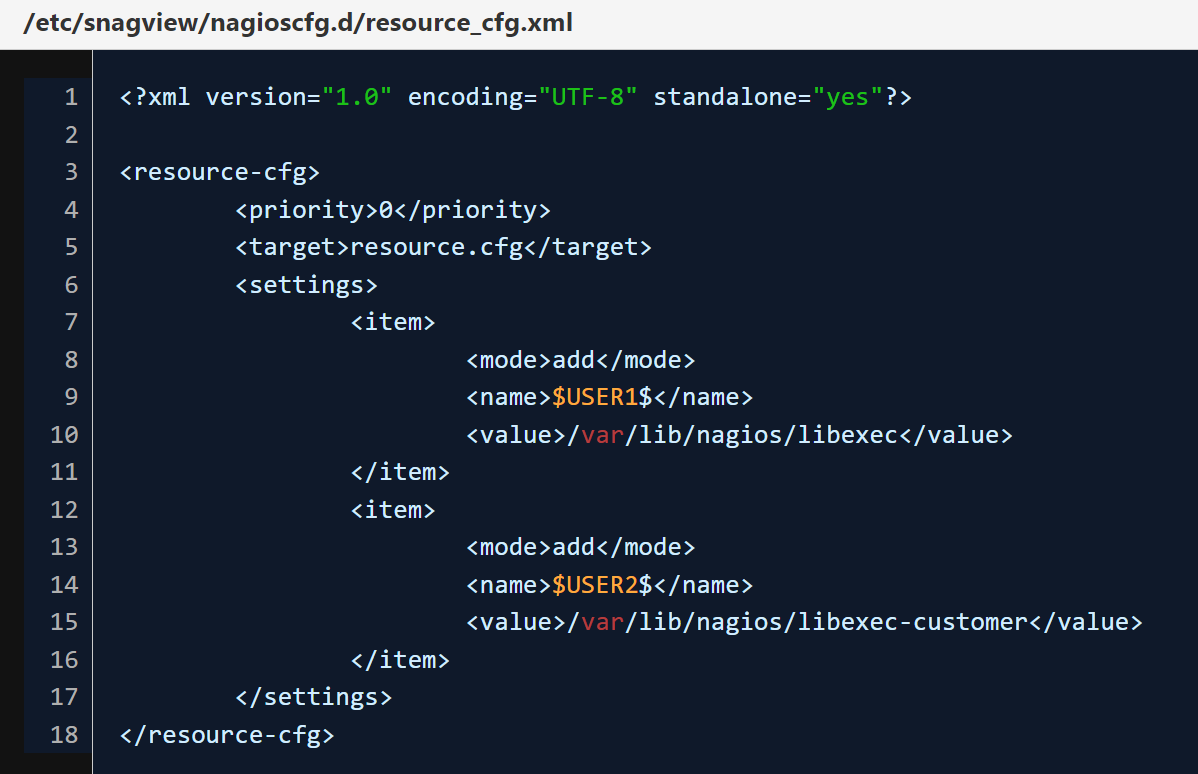
Additional placeholders for the path to plugins ($USERXXX$) can be integrated very easily in SNAG-View. The following steps are necessary for this:
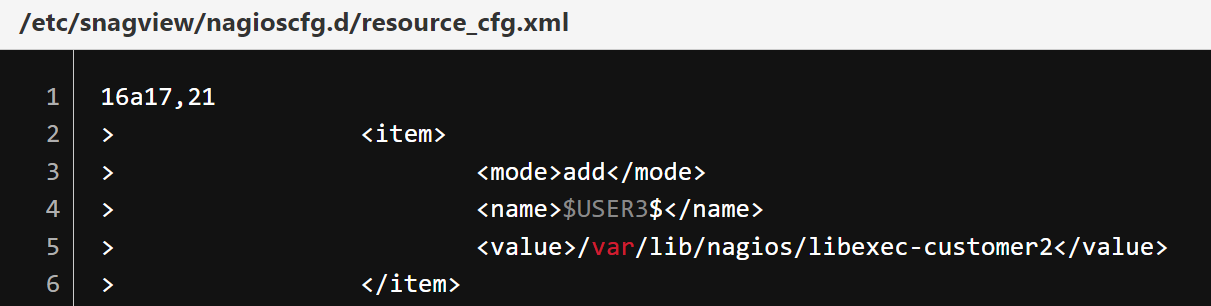
A new <item> entry must be created in the "resource_cfg.xml".
Note: Be careful not to change or delete existing <item> entries.
Example:
We currently ship two predefined macros: "$USER1$ and $USER2$". After the change, the macro $USER3$ is available for the path /var/lib/nagios/libexec-customer2.
The script "/usr/bin/createNagiosCfg.sh" is then executed, so that the configuration is saved and saved in the resource.cfg.